Ascend 学习笔记 01 - 基本结构
Ascend.
Kernel 侧实现
1. Init
__aicore__ inline void Init(GM_ADDR x, GM_ADDR y, GM_ADDR z, uint32_t totalLength, uint32_t tileNum)
{
    this->blockLength = totalLength / AscendC::GetBlockNum();
    this->tileNum = tileNum;
    this->tileLength = this->blockLength / tileNum / BUFFER_NUM;

    xGm.SetGlobalBuffer((__gm__ DTYPE_X *)x + this->blockLength * AscendC::GetBlockIdx(), this->blockLength);
    yGm.SetGlobalBuffer((__gm__ DTYPE_Y *)y + this->blockLength * AscendC::GetBlockIdx(), this->blockLength);
    zGm.SetGlobalBuffer((__gm__ DTYPE_Z *)z + this->blockLength * AscendC::GetBlockIdx(), this->blockLength);
    pipe.InitBuffer(inQueueX, BUFFER_NUM, this->tileLength * sizeof(DTYPE_X));
    pipe.InitBuffer(inQueueY, BUFFER_NUM, this->tileLength * sizeof(DTYPE_Y));
    pipe.InitBuffer(outQueueZ, BUFFER_NUM, this->tileLength * sizeof(DTYPE_Z));
}

private:
    AscendC::TPipe pipe;
    AscendC::TQue<AscendC::QuePosition::VECIN, BUFFER_NUM> inQueueX, inQueueY;
    AscendC::TQue<AscendC::QuePosition::VECOUT, BUFFER_NUM> outQueueZ;
    AscendC::GlobalTensor<DTYPE_X> xGm;
    AscendC::GlobalTensor<DTYPE_Y> yGm;
AscendC::GlobalTensor<DTYPE_Z> zGm;GM_ADDR: 参数在 Global Memory 的内存地址,通常是一个连续的区域(?)totalLength: 数据总体长度,即有一个 x 。tileNum: 分片数量,totalLength 长度的数据,分成几片送入 NPU。
this->blockLength = totalLength / AscendC::GetBlockNum();
// 例如:总共有 1024单位 的数据 totalLength = 1024, 总共有2个AICore核心,每个核心处理512个长度的数据。即每块要处理多长的数据

this->tileNum = tileNum; // 每一个AICore,总共要送进去多少次数据,即要送入多少个 tile

this->tileLength = this->blockLength / tileNum / BUFFER_NUM;
// 每次送入缓冲区的数据长度。本来应该 tile数量 * 每tile数据长度 = 总Block数据长度,
// 但是用了double buffer策略,加速送入缓冲区的效率.
// 例如,每个核心需要送入 512单位 的数据,分成128次送,每次只用送入 4 个单位的数据。
// 再由于 double buffer,每次只用送入 2个单位,在这两个单位进行运算的时候,送入另外2个单位-
AscendC::GlobalTensor<T>:用来存放 GlobalMemory 中的数据。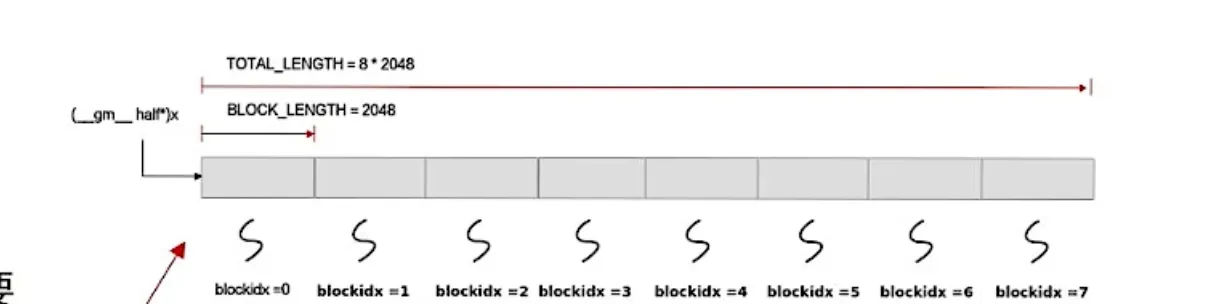
xGm.SetGlobalBuffer((__gm__ DTYPE_X *)x + this->blockLength * AscendC::GetBlockIdx(), this->blockLength); // (__gm__ DTYPE_X *)x 把 x 转换成 __gm__ DTYPE 类型的指针 // x + this->blockLength * GetBlockIdx(),第i块核心的数据索引开头的指针 // this->blockLength 这一块的长度 -
pipe.InitBuffer(inQueueX, BUFFER_NUM, this->tileLength * sizeof(DTYPE_X));:初始化管道// inQueueX 管道对象 // BUFFER_NUM,几个缓冲区 // 管道总大小:this->tileLength * sizeof(DTYPE_X) ,管道一次只能塞满一个tile的数据,总共有 tileLength 个数据,每个数据 sizeof(DTYPE_X) 字节InitBuffer完成后,inQueueX内还是空的。inQueueX要保存的数据在 localTensor 里。
2. Process
__aicore__ inline void Process()
{
    int32_t loopCount = this->tileNum * BUFFER_NUM;
    // 循环次数,tile数量,每个tile本来应该就是一次操作,但是double buffer了,本来的一次操作拆成了两次,每次操作的大小为原来的一半。
    for (int32_t i = 0; i < loopCount; i++) {
        CopyIn(i);
        Compute(i);
        CopyOut(i);
    }
}
3. CopyIn
__aicore__ inline void CopyIn(int32_t progress)
{
    AscendC::LocalTensor<DTYPE_X> xLocal = inQueueX.AllocTensor<DTYPE_X>();
    AscendC::LocalTensor<DTYPE_Y> yLocal = inQueueY.AllocTensor<DTYPE_Y>();
    AscendC::DataCopy(xLocal, xGm[progress * this->tileLength], this->tileLength);
    AscendC::DataCopy(yLocal, yGm[progress * this->tileLength], this->tileLength);
    inQueueX.EnQue(xLocal);
    inQueueY.EnQue(yLocal);
}-
progress: 核心的编号。 -
LocalTensor<T>: AICore 中的数据区域。AscendC::LocalTensor<DTYPE_X> xLocal = inQueueX.AllocTensor<DTYPE_X>(); // 动态分配空间,在AIcore内部分配一个空间,长度刚好一个tileLength // inQueueX知道 tileLength 是多少,分配出来的 -
DataCopyAscendC::DataCopy(xLocal, xGm[progress * this->tileLength], this->tileLength); // 从xGm第progress个块的起始位置开始,复制 tileLength 长度的数据,存入 xLocal -
inQueueX.EnQue队列里塞进去刚刚分配的 xLocal 。应该存的是一个指针。
概述一下:
- 分配了一个内核中的内存空间
- 把 GlobalMemory 中的数据拷贝进这段内核内存空间
- TQue中记录这个内存空间的指针
分配了一个内核空间存放外部数据,记录在TQue里,之后需要释放。
4. Compute
__aicore__ inline void Compute(int32_t progress)
{
    AscendC::LocalTensor<DTYPE_X> xLocal = inQueueX.DeQue<DTYPE_X>();
    AscendC::LocalTensor<DTYPE_Y> yLocal = inQueueY.DeQue<DTYPE_Y>();
    AscendC::LocalTensor<DTYPE_Z> zLocal = outQueueZ.AllocTensor<DTYPE_Z>();
    AscendC::Add(zLocal, xLocal, yLocal, this->tileLength);
    outQueueZ.EnQue<DTYPE_Z>(zLocal);
    inQueueX.FreeTensor(xLocal);
    inQueueY.FreeTensor(yLocal);
}
从队列中取出单块的数据指针。
进行运算。调用 Ascend::Add 这是一个基础的矢量计算。
要记得,xLocal中的数据总共有 tileLength 个,每个是 half 。
计算完成后,释放 xLocal 的空间。
同时分配输出的 zLocal 空间,放入 outQueueZ 中。
标量双目运算符,可以在向量和标量直接运算,命名为 XXXs。例如:
half a=-1
Muls(xLocal, xLocal, a, this->tileLength);
就是给xLocal全部取负。
5. CopyOut
__aicore__ inline void CopyOut(int32_t progress)
{
    AscendC::LocalTensor<DTYPE_Z> zLocal = outQueueZ.DeQue<DTYPE_Z>();
    AscendC::DataCopy(zGm[progress * this->tileLength], zLocal, this->tileLength);
    outQueueZ.FreeTensor(zLocal);
}
取出结果,拷贝回 Global Memory。
释放 zLocal。
Host 侧实现
1. Tiling结构体
namespace optiling {
BEGIN_TILING_DATA_DEF(TilingData)
TILING_DATA_FIELD_DEF(uint32_t, totalLength); // 两个参数,totalLength
TILING_DATA_FIELD_DEF(uint32_t, tileNum); // tileNum
END_TILING_DATA_DEF;

REGISTER_TILING_DATA_CLASS(AddCustom, TilingData)
} // namespace optiling
就是核函数的构造参数。内部数据可以自己定。
还不明白 tiling 可以怎么设计优化。
2. TilingFunc
namespace optiling {

const uint32_t BLOCK_DIM = 8;  // 几个核心
const uint32_t TILE_NUM = 8;   // 拆分几次送进
static ge::graphStatus TilingFunc(gert::TilingContext *context)
{
    TilingData tiling;
    uint32_t totalLength = context->GetInputShape(0)->GetOriginShape().GetShapeSize(); // 获取第0个Input的Shape,获取原始形状,获取形状
    context->SetBlockDim(BLOCK_DIM); // 设置核心数量
    tiling.set_totalLength(totalLength); // 给tiling设置总长度
    tiling.set_tileNum(TILE_NUM); // 设置tiling数量
    tiling.SaveToBuffer(context->GetRawTilingData()->GetData(), context->GetRawTilingData()->GetCapacity());
    // 把context里的原始数据保存到buffer里。context->GetRawTilingData(),有data和capacity。
    context->GetRawTilingData()->SetDataSize(tiling.GetDataSize());
    // 设置dataSize。capacity和datasize有什么区别? capacity是最大容量,datasize是数据大小。
    size_t *currentWorkspace = context->GetWorkspaceSizes(1); // 设置WorkSpace,不懂
    currentWorkspace[0] = 0;
    return ge::GRAPH_SUCCESS;
}

} // namespace optiling
gert::TilingContext *contextTiling 上下文,Tiling结构体就保存在这个上下文里,还有输入的Tensor数据也在